WCAG 2.2 AA accessibility audits
Find and fix the accessibility barriers on your website
I'm Michel Roun, a freelance accessibility auditor. I check your site against WCAG 2.2 AA and give you a plain-English fix list your developer can work through.
The free scan is automated, so it finds only part of the issues. It's a quick, no-commitment look at where your site stands.
- Every finding checked by hand
- Fixed, published prices
- No overlay widgets
What you get
An audit your developer can act on
Customers who use a keyboard, a screen reader or zoom should be able to use your site. I find where they get stuck and tell you how to fix it.
A WCAG 2.2 AA review
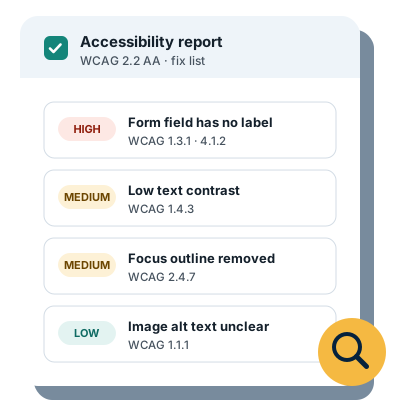
Automated scans plus manual checks of keyboard navigation, focus order, color contrast, image alt text, form labels, headings, buttons and links.
A plain-English fix list
Each issue, where it is, why it matters and how to fix it, sorted by priority so your developer knows where to start.
Findings checked by hand
AI tools help me sort findings. I verify every finding by hand before it goes in your report.
No overlay widgets
I don't sell or install overlays. Real fixes happen in your site's code, and that's what the report helps you make.
How it works
Three steps, no surprises
Ask for a free scan
Email me your site's address. I run an automated scan and send you a short summary of what it found.
Choose an audit
If you want the full picture, pick an audit and tell me which pages matter most. I review them by hand against WCAG 2.2 AA.
Fix with a clear list
You get a report your developer can work through. Higher tiers include a re-test once your fixes are in.
Sample finding
What a finding looks like
Every issue in your report follows the same format, so it's easy to hand to a developer.
- Where the issue is, with a screenshot
- Who it affects and why it matters
- The WCAG criterion it fails
- A suggested fix, with code where it helps
Newsletter email field has no label
Priority: High- Where
- Footer sign-up form, on every page
- Who it affects
- Screen reader and voice control users. The field is announced only as “edit text”, and the placeholder disappears once you start typing.
- WCAG
- 1.3.1 Info and Relationships, 3.3.2 Labels or Instructions, 4.1.2 Name, Role, Value
- Fix
- Add a visible label tied to the input.
<!-- Before -->
<input type="email" placeholder="Your email">

<!-- After -->
<label for="news-email">Email address</label>
<input type="email" id="news-email" autocomplete="email">Pricing
Fixed prices, published up front
Audits start at $149. Prices are in US dollars.
-
Quick scan + fix list
For a small site that wants a first look
$149
- Home page plus 2 key pages
- Automated scan plus manual checks
- Prioritized fix list
- PDF report with screenshots of top issues
- Delivered in 3 days
-
Recommended
Full audit
For most small business sites
$449
- Up to 8 key pages or templates
- Findings mapped to WCAG 2.2 AA
- Developer-ready fix tickets
- PDF report plus a spreadsheet of issues by severity
- Delivered in 5 days
-
Audit + re-test
For sites that want proof the fixes worked
$749
- Up to 15 pages
- Everything in the full audit
- Re-test after your fixes, with a re-test report
- Draft accessibility statement
- Delivered in 7 days
-
Monthly monitoring
To catch new issues as your site changes
$49 per month
- Available after an audit
- Monthly re-scan of up to 10 pages
- Short report on what changed
FAQ
Questions
What is WCAG?
The Web Content Accessibility Guidelines (WCAG) are the international standard for making websites usable by people with disabilities. They're published by the W3C. Version 2.2 is the latest, and level AA is the level most organizations aim for.
Will an audit protect me from an ADA complaint or lawsuit?
No audit can guarantee legal compliance, and I don't give legal advice. An audit shows you real barriers and how to fix them, which is the practical work behind accessibility. If you've received a complaint or demand letter, please talk to a lawyer as well.
Can't I just install an accessibility overlay widget?
Overlays add a toolbar on top of your site, but they don't fix the underlying code, and many people who use assistive technology find they get in the way. I don't use or recommend them. The fix list helps you correct issues at the source.
How long does an audit take?
The quick scan + fix list takes 3 days, the full audit 5 days, and the audit + re-test 7 days, counted from when I have everything I need. The re-test happens once you tell me your fixes are in.
What do you need from me?
Your site's address, the pages that matter most to you (for example a product page, a contact form or checkout), and a preview link if the site is password-protected. I audit the public site, so I don't need your login.
Start with a free scan
Questions about audits or monitoring, or a free scan: email me and I'll reply personally.
Or write to hello@opensiteaudit.com.